Melodyne vs Auto-Tune: What's the Actual Difference?
If you spend enough time producing music, you'll eventually come across the same debate: Melodyne vs. Auto-Tune. People often compare them as if they're competing plugins, but I don't really see it that way.
On this page
mixwithwill
Ready to hear what your vocals can become?
Professional vocal mixing, handled personally by Will.
Start your mixThey're both designed to correct pitch, but that's about where the similarities end. One makes automatic decisions. The other puts those decisions entirely in your hands.
As someone who spends most of my time mixing vocals, I'd never say one is "better" than the other. Most of the world's best vocal mixing engineers will often use both in the same session.
What Does Auto-Tune Actually Do?
Auto-Tune is exactly what the name suggests. It automatically tunes a vocal.
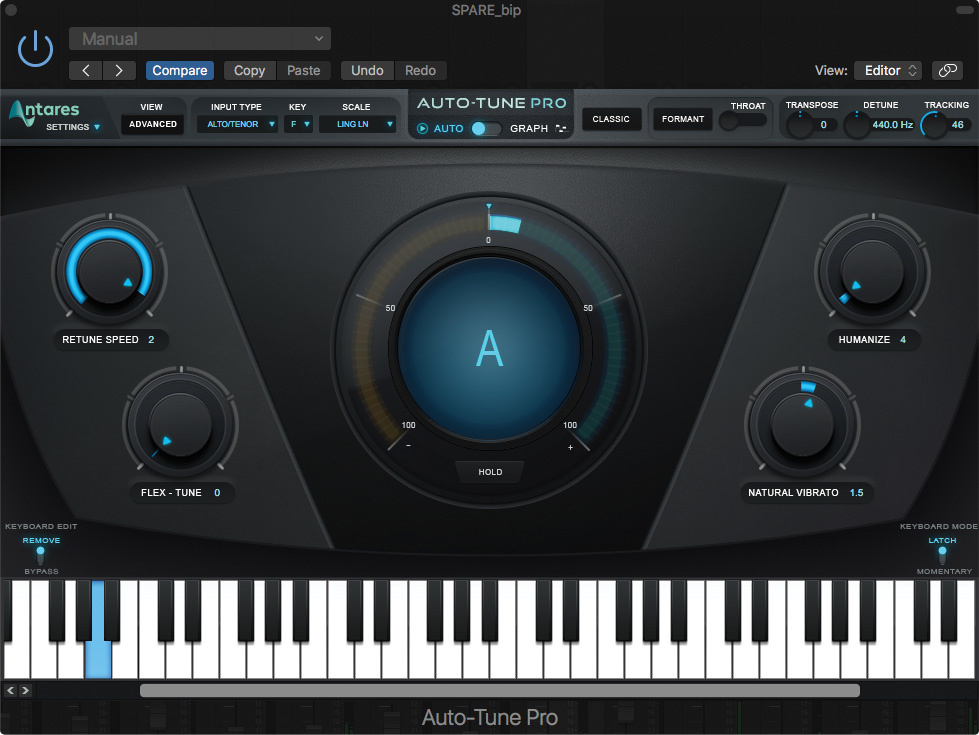
Once you've set the correct key, the plugin listens to the incoming vocal and gently (or not so gently) pushes each note towards the nearest pitch. That's why it's become a standard tool for recording sessions and live performances. The singer doesn't need someone manually editing every note afterwards because Auto-Tune is already correcting things in real time.
How obvious it sounds depends almost entirely on the settings. With slower retune speeds, most people won't even realize it's there. Speed it up enough, though, and you get the unmistakable effect that's become part of modern hip-hop and pop. Travis Scott, Future, and T-Pain all use Auto-Tune, but in completely different ways.
One thing worth mentioning is that Auto-Tune isn't just one plugin anymore. There are loads of alternatives. Some of the most popular are:
- Antares Auto-Tune (still the industry standard)
- Waves Tune Real-Time
- Brainworx bx_crispytuner
- MAutoPitch (Free)
- Graillon (Free version)
Some are free, others cost several hundred dollars, but I've never believed the plugin is the thing that makes a vocal sound professional. Give an experienced engineer a free plugin and they'll usually get a better result than someone who owns every expensive plugin available.
What Does Melodyne Do?
Melodyne takes a completely different approach.
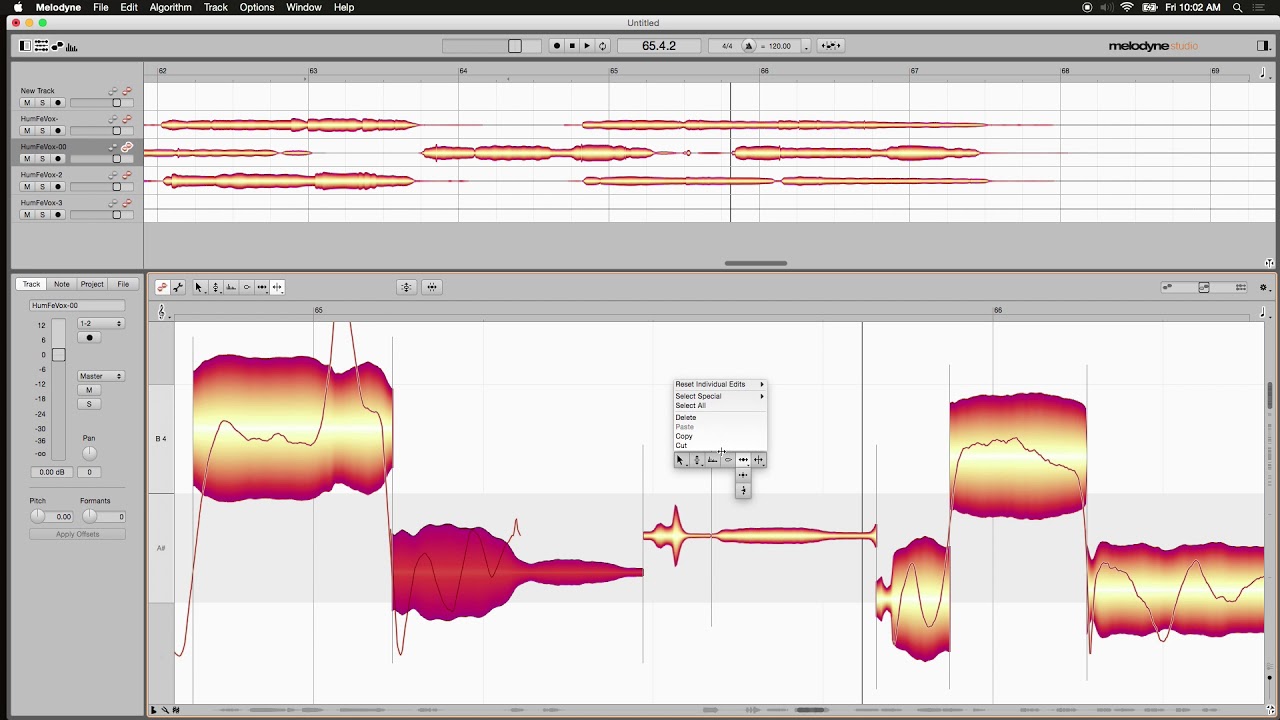
Instead of automatically correcting your vocal, it lets a vocal engineer go through the performance note by note and decide exactly what should be changed. That includes things like:
- Pitch
- Timing
- Vibrato
- Pitch drift
- Note transitions
- Sibilance (Studio version)
The important difference is that Melodyne isn't trying to make decisions for you. You're making them yourself.
That's a huge reason why it's become the industry standard for manual vocal tuning. If the goal is to make a vocal sound polished without anyone noticing it has been tuned, Melodyne is usually where engineers start.
Melodyne Isn't the Only Way to Tune Vocals Manually
Even though Melodyne gets most of the attention, it's definitely not the only option. Logic Pro includes Flex Pitch, and I've used it myself plenty of times. For small corrections, it's actually a really useful tool, especially considering it's included with Logic.
The problem is that it reaches its limits fairly quickly. Once you start making larger corrections, Flex Pitch tends to introduce artifacts that make the vocal sound processed instead of natural. That's where Melodyne really starts to justify its reputation. The edits are cleaner, the workflow is more precise, and you have significantly more control over every detail.
The Hardest Part Isn't Learning Melodyne
When people first open Melodyne, they usually focus on moving notes around. Ironically, that's the easy part.
The difficult part is developing the judgment to know which notes actually need correcting and which ones are better left alone. I've seen engineers build entire careers around vocal tuning alone. A few years ago I probably wouldn't have understood why; now I completely do.
One thing I've noticed over the years is that people often assume "perfect tuning" means every note should sit dead-center on the pitch. I almost never approach it like that. Real singers aren't robots, nor should they sound like one. Sometimes a note that's a few cents sharp carries exactly the emotion the performance needs. Correcting it might make it technically more accurate, but it doesn't necessarily make it better.
That's probably the biggest lesson Melodyne teaches you.
You're not trying to create perfect pitch. You're trying to create a performance that still feels human.
Melodyne vs. Auto-Tune: Which Sounds Better?
Neither. Or both. It completely depends on what you're trying to achieve.
| Feature | Melodyne | Auto-Tune |
|---|---|---|
| Manual editing | Note-by-note, full control | Limited (graph mode only) |
| Real-time tuning | No, offline editing | Yes, corrects as you sing |
| Natural correction | Its main strength | Depends on the settings |
| Creative effect | Not designed for it | The signature sound |
| Workflow | Manual, note by note | Automatic, real-time |
If someone wants the recognizable Auto-Tune sound that's become part of modern rap and pop production, then Auto-Tune is obviously the right tool. If the goal is for nobody to notice the tuning at all, Melodyne is usually the better choice.
In reality, these plugins aren't competitors. A very common workflow is to manually tune the vocal in Melodyne first and then use a subtle amount of Auto-Tune afterwards to catch the tiny inconsistencies that remain. Used carefully, the listener will never know either plugin was involved.
Should Every Vocal Be Tuned with Melodyne?
Not necessarily.
I don't include Melodyne as standard with every vocal mix because not every project calls for that level of editing. Some artists genuinely prefer a slightly more natural performance, while others specifically ask for detailed manual tuning.
That said, if someone is chasing a commercial-quality vocal, I'll almost always recommend adding Melodyne. For me, it's usually the final 10%. Not because the vocal suddenly becomes unrecognizable, but because dozens of tiny improvements add up. The pitch feels more consistent, transitions between notes become smoother, and the performance simply feels more finished.
The funny part is that when Melodyne has been used well, nobody should be talking about Melodyne afterwards.
Frequently asked questions
Is Melodyne better than Auto-Tune?
Neither is better. It completely depends on what you're trying to achieve. If you want the recognizable Auto-Tune sound, Auto-Tune is the right tool. If the goal is for nobody to notice the tuning at all, Melodyne is usually the better choice.
What's the difference between Melodyne and Auto-Tune?
Auto-Tune automatically pushes each note towards the nearest pitch in real time, while Melodyne lets an engineer go through the performance note by note and decide exactly what should be changed, including pitch, timing, vibrato, pitch drift and note transitions.
Can you use Melodyne and Auto-Tune together?
Yes. A very common workflow is to manually tune the vocal in Melodyne first and then use a subtle amount of Auto-Tune afterwards to catch the tiny inconsistencies that remain. Used carefully, the listener will never know either plugin was involved.
Does every vocal need Melodyne?
Not necessarily. Not every project calls for that level of editing, and some artists prefer a more natural performance. But if you're chasing a commercial-quality vocal, adding Melodyne is usually the final 10%.
Are there free alternatives to Auto-Tune?
Yes. MAutoPitch and the free version of Graillon are both popular free options. The plugin isn't what makes a vocal sound professional, though; an experienced engineer will usually get a better result with a free plugin than a beginner with every expensive one.
Continue reading
Best Vocal Plugins (2026): 27 Plugins Used by Professional Vocal Mix Engineers
The plugins that keep showing up on professional vocal chains in 2026, organized by category, with what each one is actually good for. Not affiliate picks, just the tools that work.
How to Mix Pop Vocals: A Complete Guide to Pop Vocal Mixing
Pop vocals live on clarity, brightness, and polish. Here's the full pop vocal chain I use, the settings I start from, and the industry-standard plugins behind a radio-ready vocal.
AI Mixing vs. Professional Mixing: Which One Actually Gets Your Song Ready to Release?
AI is genuinely useful for demos and quick reference bounces. Where it falls apart is release-ready vocals. What it gets right, what it misses, and when to just hire someone.